
TikTok slideshow size: official photo limits and the slide shapes of 125 posts
By Jack, Marketing Lead at Viral Garden
Published
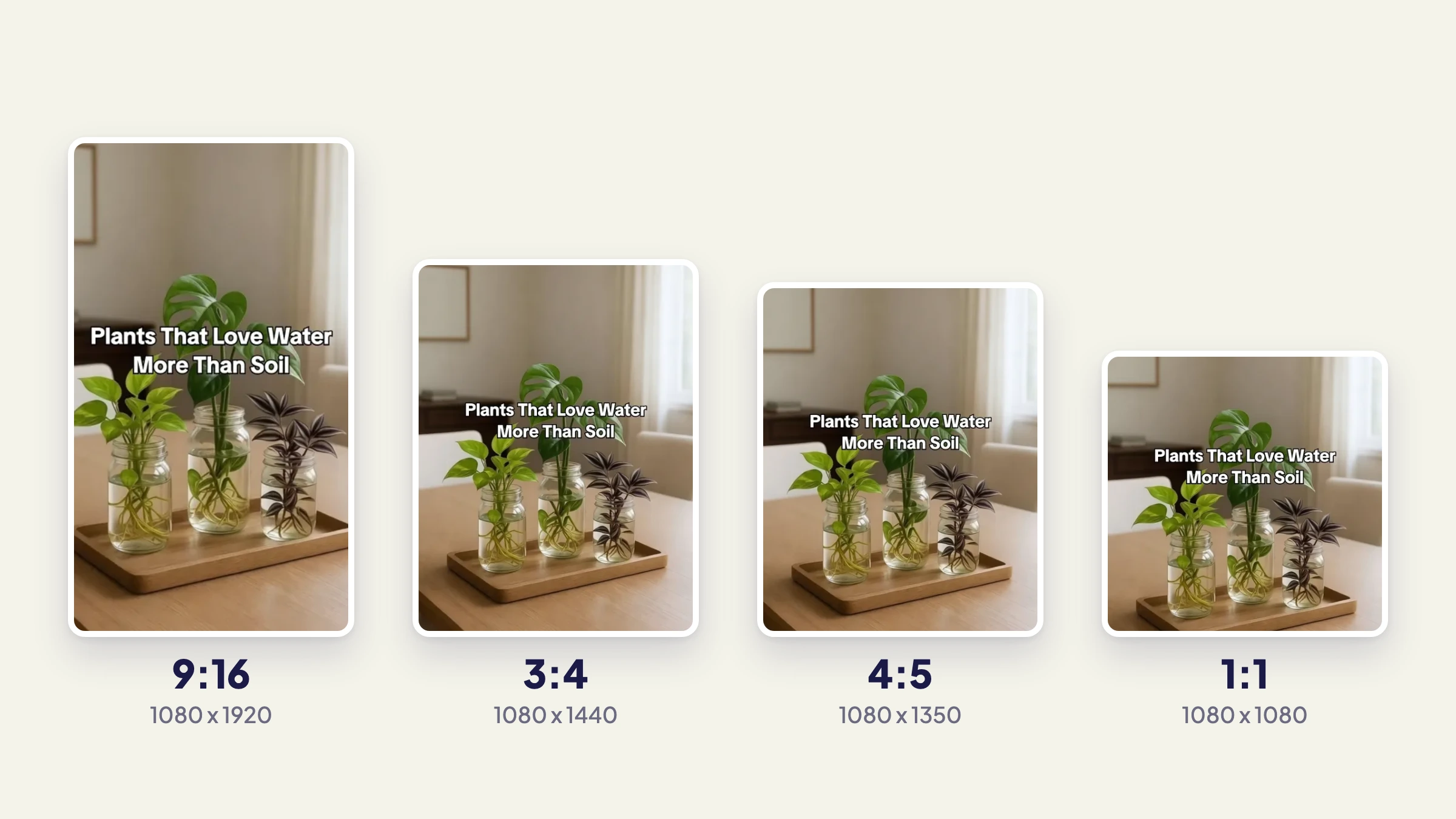
TikTok publishes no recommended size or aspect ratio for slideshows made in its app, as of October 2026. Its own pages give a limit of 35 photos, a crop tool and the advice to crop every photo to the same ratio, and apps that post through TikTok's API must send JPEG or WebP images no larger than 1080p and 20MB each. The 1080 x 1920 that most size guides quote appears on TikTok's pages only as advice for video covers. Among 125 TikTok slideshows imported as templates into Viral Garden, which publishes this blog, 3:4 (1080 x 1440) was the most common slide shape, used by 47 posts, against 26 at full-screen 9:16. For your own posts, make every slide 1080 pixels wide and give every slide in a post the same shape.
What TikTok specifies for photo posts
| What TikTok says | Where it says it | |
|---|---|---|
| Photos per post | Up to 35 | Making a post, Photo |
| Fewest photos | Not stated for the app or the API; "more than 1" through Share Kit for Android | Share Kit for Android |
| Aspect ratio | Not stated for the app, beyond cropping all photos to the same ratio; 1/2.2 to 2.2 through Share Kit for iOS | Unleash Your Creativity: Tell Stories with Photos on TikTok, Share Kit for iOS |
| Pixel size | Not stated for the app; "Maximum 1080p" through the API | Media Transfer Guide |
| File type | Not stated for the app; WebP or JPEG through the API | Media Transfer Guide |
| File size | Not stated for the app; 20MB per image through the API | Media Transfer Guide |
| Cover | One of the post's own photos through the API; the app has an Edit cover step | Photo, Making a post |
In the app, the only size control TikTok describes is cropping. After you pick your photos, its help page says you "can add a filter, sound, text, stickers, or crop your photos" (Making a post), and the full steps are in how to make a slideshow on TikTok. TikTok's guide to photo posts for creators adds one line on shape, "Crop all photos to the same ratio to give it a cleaner look," and names no ratio (Unleash Your Creativity: Tell Stories with Photos on TikTok).
Firmer numbers sit in TikTok's developer docs, mostly for apps that post for you, such as schedulers, which go through TikTok's Content Posting API. Its Media Transfer Guide accepts WebP and JPEG, with "Maximum 1080p" and "Maximum of 20MB for each image". PNG is not on that list, and "1080p" doesn't say which side it measures. Viral Garden sends every slide at no more than 1080 pixels wide; a note in its code says TikTok's photo endpoint rejects wider images with picture_size_check_failed, a failure TikTok's Get Post Status reference lists for an unsupported picture size.
The one aspect-ratio rule in TikTok's developer docs covers apps that hand photos to the TikTok app through Share Kit for iOS: "The aspect ratio of images or videos should be between 1/2.2 and 2.2" (Share Kit for iOS). That range runs from taller than 9:16 to more than twice as wide as it is tall. The Android version gives no ratio and asks for "more than 1 and up to 35" images (Share Kit for Android).
Where 1080 x 1920 and the other common numbers come from
On TikTok's own pages, 1080 x 1920 is a video number. Its Creator Academy advice on video covers, in a tip for creators who mainly feature themselves, says "Use a 9x16 aspect ratio and a 1080x1920 pixel resolution for the best results" (Leveraging high-quality video covers to attract viewers), and TikTok Studio on the web takes videos at "720x1280 resolution or higher" (Tools for creators).
Several other figures in size guides are specs for paid ads. TikTok's Specifications for Carousel Ads set 2 to 35 images, JPG or PNG files, a suggested file size of 100 KB or less, and images of 1200 x 628, 640 x 640 or 720 x 1280 pixels. The 35-image cap and JPEG also apply to ordinary photo posts, but the 100 KB suggestion, PNG and those pixel sizes appear on no TikTok page about photo posts. A few guides also give a minimum of four photos, which no TikTok page states, or a 500MB limit for a whole post, which matches TikTok's file limit for an in-feed video ad (TikTok Auction In-Feed Ads).
The slide shapes of 125 TikTok slideshows
We counted the slide shape of every distinct TikTok slideshow saved as a template in Viral Garden between July 21 and October 7, 2026: 125 posts published between October 2022 and October 2026, with a median of 292K views. Each shape is that of the slide images TikTok served, scaled to 1080 pixels wide (how we counted).
| Slide shape | Size at 1080 wide | Posts |
|---|---|---|
| 3:4 portrait | 1080 x 1440 | 47 |
| 9:16 full screen | 1080 x 1920 | 26 |
| 4:5 portrait | 1080 x 1350 | 13 |
| 1:1 square | 1080 x 1080 | 12 |
| Other | varies | 27 |
Of the 27 in other shapes, 10 were taller than 9:16, around 1080 x 2100, including the most-viewed post in the set at 36.0M views. Eight fell between 3:4 and 9:16, such as 1080 x 1620 (2:3); seven were landscape, most of them close to 4:3; and two sat between square and 4:5.
Every shape had posts past a million views. Of the 35 that got there, 15 used 3:4 slides, 9 used other shapes, 5 used 9:16, 3 were square and 3 used 4:5. The 9:16 posts had the lowest median, 42K views against 363K for the rest, but 26 hand-picked posts can't separate shape from topic, account or age.
The importer began storing each slide's own shape in late September. Among the posts added since then, at least 5 mixed shapes within one post, and in each of them the first slide's shape differed from most of the slides after it.
How a 3:4 or square photo shows in the feed
None of the TikTok pages above describes how the app shows a photo that isn't 9:16, and size guides disagree, describing black bars, a blurred or solid fill, or a crop, without a source for any of them.
TikTok doesn't turn every photo into a 9:16 file: the images it served for these 125 posts came in every shape in the table, 3:4 most often.
What size to make your slides
- Make every slide 1080 pixels wide. That is the widest TikTok's API accepts, according to Viral Garden's code, and it matches the width in TikTok's 1080 x 1920 cover advice.
- Give every slide in a post the same shape, as TikTok's guide to photo posts advises.
- Pick the shape from your material. 3:4 (1080 x 1440) keeps portrait phone photos whole, 9:16 (1080 x 1920) gives text slides the tallest of these four shapes, and 4:5 or square suit images already cut for an Instagram feed.
- If an app posts for you, export JPEG or WebP under 20MB a slide.
- Keep text and faces away from the edges. TikTok's advice on video covers describes a "safety zone", "the area of your frame that won't be covered by For You feed elements like buttons, your name, your caption, etc.", and its rule of thumb is to "avoid placing elements around the edges of your frame" (Leveraging high-quality video covers to attract viewers). It gives no pixel numbers for that zone.
- Start from sharp images. TikTok's photo guide says to "use high-quality images when possible" (Unleash Your Creativity: Tell Stories with Photos on TikTok).
Other TikTok image sizes
TikTok gives these numbers for its other images.
| Image | What TikTok says | Where it says it |
|---|---|---|
| Profile photo | At least 20 x 20 pixels; no recommended size | Adding a profile photo |
| Video cover | 9:16 at 1080 x 1920 "for the best results" | Leveraging high-quality video covers to attract viewers |
| Carousel ad images | 1200 x 628, 640 x 640 or 720 x 1280; 100 KB or less suggested; 2 to 35 images | Specifications for Carousel Ads |
| In-feed video ad | 9:16 recommended, at 540 x 960 or more | TikTok Auction In-Feed Ads |
How we counted the 125 slideshows
When Viral Garden imports a TikTok slideshow, it downloads the slide images TikTok serves and records each one's width and height, scaled to 1080 pixels wide. For the 90 posts imported from July 21 to September 27, 2026, one shape was stored per post, the shape most of its slides shared. For the 35 added from September 29 to October 7, each slide kept its own shape, and we took the shape most of its slides shared, or the first slide's on a tie. Four of those 35 were built by a script from the downloaded slides rather than by the importer, and one of the four was saved at a size TikTok never served, so for that post we counted the slides TikTok served.
A post counts as 3:4 when its height is 1.30 to 1.36 times its width, 4:5 at 1.22 to 1.26, 1:1 at 0.99 to 1.01 and 9:16 at 1.70 to 1.85. Views are TikTok's count on the day each post was imported, or around October 8 for the four built by script. The shapes are of the files TikTok served, which may differ from what the creator uploaded.
We picked almost every post because it looked worth copying, and from late September most picks were formats for promoting a product or an app. Of the 125, 82 had passed 100K views. The counts describe slideshows people chose to copy, so they can't show what made any of them popular.
Setting slide size in Viral Garden
Viral Garden makes slideshow posts from templates. Import a TikTok or Instagram slideshow as a template and each slide keeps the original's shape at 1080 pixels wide. To change a slide's shape:
- In a template, select the slide and open its Slide settings tab. In a post, select the slide to open the Slide Properties panel; if that selects a full-frame photo instead, click Slide settings at the top of the panel.
- Under Slide size, choose Portrait 3:4, Portrait 4:5, Square 1:1 or Full screen 9:16, or Custom dimensions for any size up to 4,096 pixels a side.
The change applies to that slide only, and its text and photos move to fit the new frame. Publishing to TikTok from Viral Garden takes a paid plan, and those posts go out as JPEGs no more than 1080 pixels wide. Turn a slideshow you like into a template.
More from the blog
Jack, Marketing Lead at Viral Garden
How to make a slideshow on TikTok (and what changes for a business)
The five steps to post a photo slideshow of up to 35 images in the TikTok app, and what changes when you post for a business: Commercial Sounds, the Promotional content label and scheduling.